
TradingView vs MT5 (MetaTrader 5) for UK and UAE forex traders
 Systemly Team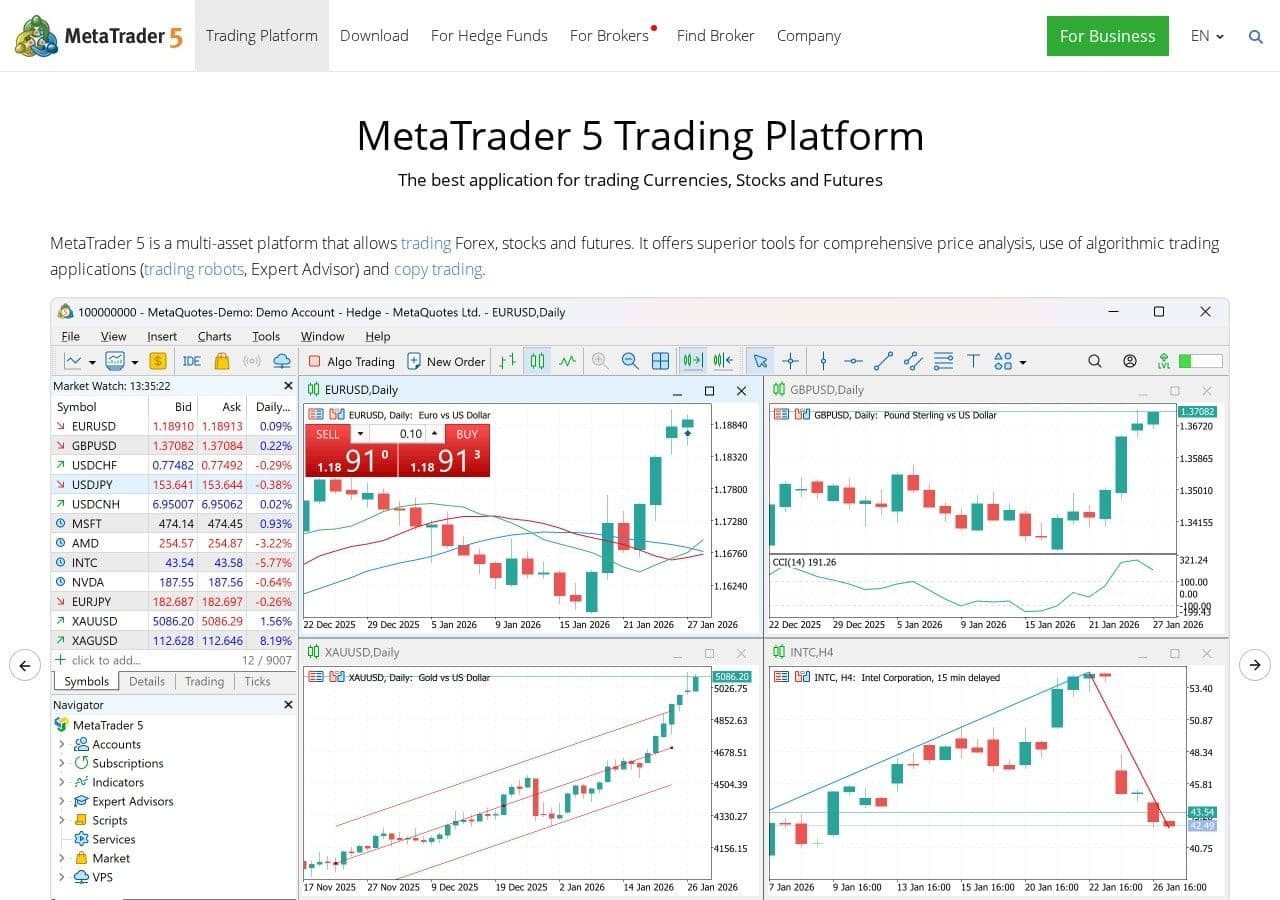
"I noticed that Tradingview and Metatrader use different closing times." A trader posted that on the BabyPips forum in 2017 (BabyPips forum), and people are still finding it out the hard way. You draw a daily level on TradingView, open MT5 to place the trade, and the candle you based it on has a different high.
Nothing is broken. The two platforms do different jobs, and they keep different clocks. TradingView is built to look at markets. MetaTrader 5 is built to trade them at your broker. Many forex traders in London and Dubai end up using both, and the useful question is which one to trust for what.
Quick answer: TradingView is a charting and analysis platform with a free plan and paid tiers from $12.95 a month billed annually; it is the better place to draw, compare markets and read the community's scripts. MetaTrader 5 is the trading terminal your broker gives you free, and it is the better place to execute, run Expert Advisors and see your broker's own prices. A common split is to analyse on TradingView and execute on MT5, checking levels on the broker's own feed. Systemly sits between them as the plan: it sizes and costs the trade for your account and can export it back to TradingView.
Systemly publishes this comparison. We have tried to be fair, and every competitor fact below is sourced and dated 13 October 2026.
Two platforms, two jobs
TradingView is a charting platform. It claims "400+ built-in indicators and strategies", "100,000+ public indicators", "110+ smart drawing tools" and 21 chart types (TradingView features). It is not a broker. Live trading means connecting "a compatible, regulated broker account" (The Investors Centre, 30 July 2026).
MetaTrader 5 is a trading terminal. MetaQuotes licenses it to brokers, who give it free to clients, and it runs Expert Advisors (EAs), custom indicators and scripts written in MQL5 (Wikipedia, MetaTrader 4). You do not pay for MT5 directly. You pay through your broker's spreads and commissions.
So the honest question is which job you need done right now. Think of it like a map and a car. You plan the route on the map because you can see everything at once. You still drive the car, and the car is where the real speed and fuel are.
Side by side
- What it is: TradingView: Charting and analysis platform; MetaTrader 5: Broker's trading terminal; Systemly: Trade-planning app with the plan drawn on a live chart
- Who supplies it: TradingView: TradingView, directly; MetaTrader 5: Your broker, licensed from MetaQuotes; Systemly: Systemly, directly
- Price: TradingView: Free Basic; Essential $12.95 to Ultimate $199.95 a month, billed annually, plus VAT; MetaTrader 5: Free; you pay broker costs; Systemly: Free plan; paid Starter, Plus and Pro with a 3-day trial
- Indicators per chart: TradingView: 2 on Basic, up to 50 on Ultimate; MetaTrader 5: Built-in and custom MQL5 indicators on desktop; about 30 built in on iOS; Systemly: Chart layers (sessions, swings, gaps) from Starter
- Custom code: TradingView: Pine Script; MetaTrader 5: MQL5, including EAs; Systemly: None; exports a plan script to TradingView (Starter and above)
- Prices you see: TradingView: Chosen data feed; MetaTrader 5: Your broker's own prices; Systemly: Live price data; scan refused if stale or gappy
- Daily candle: TradingView: Commonly New York close; MetaTrader 5: Broker server time, often GMT+2 or GMT+3; Systemly: Sessions in your local time
- Position size from your risk: TradingView: Not built into the chart; MetaTrader 5: You type the lot size; Systemly: One money figure at the printed lot, costs included
- Paper trading: TradingView: Free for all users, across markets and order types; MetaTrader 5: Broker demo accounts; Systemly: A plan placed as a paper trade on real prices with costs; every plan, up to 3 open on free
- Places trades: TradingView: Through connected brokers; MetaTrader 5: Yes, at your broker; Systemly: Pro only, into a connected broker account
- Best for: TradingView: Analysis, screening, scripts; MetaTrader 5: Execution and automation; Systemly: A checked plan for your account
The rows where Systemly is weakest are the ones that matter most to experienced traders: no custom code, paper trading only for its own plans rather than for any order you like, and a narrow toolset. That is deliberate, and it is why Systemly does not replace either platform.
Price: free against free-ish
MT5 costs nothing to download. Your broker earns from spreads and commissions instead.
TradingView's free Basic plan is genuinely usable for forex and gold. Forex and CFD broker feeds, including FXCM, FOREX.com, IG, Capital.com and CMC Markets, are listed as real-time and free (TradingView data coverage). The limits bite elsewhere. Basic allows 1 chart per layout, 2 indicators per chart and 3 active price alerts (TradingView pricing), and third-party sources say it shows ads.
The paid plans, billed annually, are Essential at $12.95 a month, Plus at $29.95, Premium at $59.95 and Ultimate at $199.95. TradingView adds VAT: 20% for UK users since May 2023 and 5% for UAE users since March 2023 (TradingView support). So Plus at $359.40 a year becomes $431.28 in the UK and $377.37 in the UAE. Whether you are billed in dollars or local currency is not confirmed, so budget in dollars.
Charts and indicators
On a desktop, both are deep. TradingView wins on breadth and polish: more chart types, more drawing tools and a public library of more than 150,000 community scripts, half of them open-source (Pine Script docs). Even a 1-star Trustpilot reviewer wrote that "The charts, tools and overall platform are very good" (Trustpilot).
MT5's charts are functional rather than pretty. One Trustpilot reviewer wrote that "The charts in MetaTrader 5 look like they were drawn by hand" (Trustpilot, metatrader5.com). Note that MT5's Trustpilot page scores 1.4 from 203 reviews, and many reviews blame the software for problems with the brokers that use it. On Google Play, the MT5 app rates 4.7 from about 1.22 million reviews (Google Play).
MT5's real strength is automation. If you want an EA to trade a rule while you sleep, MT5 is built for that. Its MQL5 Market sells and rents EAs and indicators, with a $30 minimum price and purchases that are not returnable (Finance Magnates, 5 August 2026).
On your phone
This is where many beginners in both countries live, and the gap is real. According to Volity's July 2026 guide to MT5 on iOS (Volity):
- "EAs run only on the desktop terminal or via a VPS."
- "Custom indicators developed in MQL5 do not run on iOS."
- The built-in library has "about 30 indicators".
- Simultaneous charts are capped at four on iPad and two on iPhone held sideways.
- Backtesting is desktop-only.
TradingView's mobile app rates 4.8 on the UK App Store from about 50,000 ratings (Apple App Store UK). Its newest feature, AI Copilot, is not in the mobile apps yet (TradingView blog).
Server time: why your daily candles do not match
Many MT4 and MT5 brokers set server time to "GMT+2 or GMT+3, depending on daylight savings", so that the daily candle closes at 17:00 New York (VT Markets). TradingView's forex charts commonly use the New York close too, as one BabyPips poster put it: "Tradingview has NY close so you can compare broker charts to that" (BabyPips forum). But not every broker follows New York. In the same thread, another poster said: "Its common for UK-based brokers to close their daily charts at about 2200hrs UK time."
Here is what the New York close means on your own clock.
- Summer (to 24 October 2026): Daily candle roll, UK: 22:00; Daily candle roll, Dubai: 01:00 next day; MT5 server clock vs UK: Server is 2 hours ahead
- Out-of-sync week (25 to 31 October 2026): Daily candle roll, UK: 21:00; Daily candle roll, Dubai: 01:00 next day; MT5 server clock vs UK: Server is 3 hours ahead
- Winter (from 1 November 2026): Daily candle roll, UK: 22:00; Daily candle roll, Dubai: 02:00 next day; MT5 server clock vs UK: Server is 2 hours ahead
Times follow the 17:00 New York convention, calculated from the official clock-change dates. A broker that follows New York switches its server clock on the US dates, so a UK trader sees an odd extra hour for one week, and a Dubai trader, whose clock never moves, sees the daily roll shift by an hour on 1 November. After the October week, the next out-of-sync window is 14 to 27 March 2027.
The common mistake is to draw a daily high on one platform and set a stop against it on the other. The consequence is a stop a few pips on the wrong side of a level that only existed on one chart. Think of it like two shops with different closing times both selling "today's bread". The loaf is the same, but "today" ends at a different hour. Pick one platform's daily candle for decisions and check levels on your broker's feed before you trade. Our guide to forex trading sessions and market hours covers the session times in full.
Brokers in the UK and UAE
MT5 comes with most FCA-regulated and UAE-regulated forex brokers, and some also offer cTrader, which we weigh up in cTrader vs TradingView vs Systemly. TradingView connects to a shorter list, and the official directory shows no regulator labels, so you have to check regulation yourself (TradingView brokers).
In the UK, The Investors Centre lists Pepperstone (TradingView only on its Razor account), IG, Capital.com (CFDs only via TradingView), StoneX Trading and Trade Nation as FCA-regulated TradingView brokers (The Investors Centre). City Index became StoneX Trading on TradingView on 1 October 2026 (TradingView blog).
In the UAE, CompareForexBrokers lists Pepperstone, ThinkMarkets, IG and Swissquote under the DFSA, and Capital.com and CFI under the CMA, which was called the SCA until 1 January 2026 (CompareForexBrokers UAE). These are comparison-site listings, not register checks, and we are not recommending any of them.
Even on the same broker, symbols can differ. Pepperstone's help tells TradingView users that "Certain instruments may have different symbols between brokers" (Pepperstone). On gold, TradingView's default XAUUSD page uses OANDA's feed (TradingView XAUUSD), which may not be your broker's.
AI on both platforms
Both added AI in 2026, and neither makes trading decisions for you. MT5 build 6180, released on 3 September 2026, added an AI assistant that can read test reports and logs and add indicators to the chart (MetaQuotes). Finance Magnates notes that "Judgment-based functionality, trading decisions on a live account, remains unavailable at this stage" (Finance Magnates). TradingView's AI Copilot, a paid add-on from 28 September 2026, draws, sets alerts and writes Pine Script on request. We compare it in detail in TradingView AI Copilot vs Systemly.
A worked example: the sum neither platform does for you
Both platforms will take an order of any size. Neither works out the size from your risk on the chart. Here it is by hand, assuming £1 buys $1.34 for illustration.
A £1,000 account risking 1% can lose £10, or $13.40. A forex lot size calculator turns that into lots, but here is the working. On EUR/USD, one pip on one standard lot is worth $10. With a 20-pip stop, one lot loses $200. So $13.40 ÷ $200 = 0.067 lots. Round down to 0.06, because rounding up adds risk. Real risk: 0.06 × $200 = $12.00, about £8.96, or 0.9% of the account.
Then add the spread. If the gap between buy and sell is 1 pip, you start 1 pip down, which is $0.60 at 0.06 lots. A position size calculator does the first sum. Systemly prints the lot and one money figure for it, with trading cost included at the stop.
Where TradingView is the better choice
TradingView is the better choice for analysis. If you compare markets, draw across timeframes, screen stocks, write Pine Script or want free paper trading for every user across many markets and order types (TradingView support), it is the stronger tool.
Where MetaTrader 5 is the better choice
MT5 is the better choice for execution and automation. If you run EAs, need your broker's exact prices for tight stops, or trade at a broker that does not connect to TradingView, MT5 is where the trade should live. It is free, it is everywhere, and its prices are the ones your stop will actually hit. If you are still on MT4, our guide to whether MT4 is being discontinued covers the move to MT5.
Where Systemly sits between them
Systemly (systemly.ai) is a UK-built forex and gold trade-planning app that turns live price data into a complete trade plan, with entry, stop, targets, position size and plain-English reasoning, and teaches the terms in a built-in academy of 32 courses.
Neither builds the plan for you, or says "no trade" when checks fail. Systemly does that one job. The plan is drawn on a full-screen chart, with a numbered moves card, a countdown to the next decision and one money figure. When the strategy's checks fail, it says "no trade" and lists why. A plan can also be placed as a paper trade, on every plan including free, filled on real prices with spreads and costs. On Starter and above, the plan exports to TradingView as a Pine Script with a trade table quoting the same stop and money. The full picture is in TradingView vs Systemly, and the MT5 side is in MT5 vs Systemly.
How we compared
We compared the two platforms on 13 October 2026 using TradingView's pricing, features, data and support pages, MetaQuotes' release notes, a July 2026 guide to MT5 on iOS, broker help pages, store ratings and forum threads on candle times. Time tables use the 17:00 New York convention. Broker lists come from comparison sites and are not register checks. Prices change, so check before you pay.
FAQ
Is TradingView better than MT5 for forex?
For analysis, TradingView is usually the stronger tool, with more drawing tools, chart types and community scripts. For execution and automation, MT5 is usually stronger, because it is your broker's own terminal and runs Expert Advisors. A common approach is to analyse on TradingView and place trades on MT5, checking key levels on the broker's feed first.
Is MT5 free?
Yes. MetaQuotes licenses MT5 to brokers, who give it to clients free. You pay through the broker's spreads and commissions instead. Paid add-ons such as EAs or indicators from the MQL5 Market cost extra, with a $30 minimum price for paid products, and those purchases are not returnable.
Can I trade on TradingView instead of MT5?
Yes, if your broker connects to TradingView. TradingView is not a broker, so you link a regulated broker account to trade from its charts. In the UK, comparison sites list brokers such as IG, Pepperstone and Capital.com. In the UAE, they list DFSA and CMA firms. Check each firm's regulator yourself before you connect anything.
Why are TradingView and MT5 daily candles different?
Because they often end the day at different times and use different price feeds. Many MT5 brokers set server time to GMT+2 in winter and GMT+3 in summer so the day ends at 17:00 New York, which is 22:00 UK and 01:00 or 02:00 Dubai. Some UK brokers close at about 22:00 UK. Different feeds also quote slightly different prices.
Does MT5 work on iPhone?
Yes, but with limits. According to a July 2026 guide, MT5 on iOS has about 30 built-in indicators, cannot run Expert Advisors or custom MQL5 indicators, and caps simultaneous charts at two on iPhone held sideways and four on iPad. Backtesting is desktop-only. For full functionality you need the desktop terminal.
What time is the MT5 server in Dubai?
On the common GMT+2 or GMT+3 convention, an MT5 server runs one hour behind Dubai in summer and two hours behind in winter, because Dubai stays on UTC+4 all year. The switch happens on the US clock-change dates, so from 1 November 2026 the daily candle roll moves from 01:00 to 02:00 Dubai time. Check your own broker's setting.
Which is better for gold, TradingView or MT5?
For studying gold, TradingView offers many XAUUSD feeds, with OANDA's as the default. For placing a gold trade, your broker's MT5 shows the prices your stop will actually hit. Spot gold feeds can differ between brokers, so a level drawn on one feed may sit slightly differently on another. Check it on your broker's chart first.
Plan once, then use whichever platform you like
TradingView and MT5 are both good at their own jobs, and you will probably keep both. What neither gives you is the plan. Build a free trade plan on Systemly, or look at real plans in the community feed to see the fields first.
Sources
- TradingView features: https://www.tradingview.com/features/
- TradingView pricing: https://www.tradingview.com/pricing/
- TradingView data coverage: https://www.tradingview.com/data-coverage/
- TradingView support, VAT: https://www.tradingview.com/support/solutions/43000684741-why-tax-has-been-added-to-my-bill/
- TradingView support, paper trading: https://www.tradingview.com/support/solutions/43000516466-paper-trading-main-functionality/
- TradingView brokers directory: https://www.tradingview.com/brokers/
- TradingView blog, City Index is now StoneX Trading: https://www.tradingview.com/blog/en/city-index-is-now-stonex-trading-61299/
- TradingView blog, AI Copilot: https://www.tradingview.com/blog/en/ai-copilot-now-on-tradingview-61231/
- TradingView XAUUSD symbol page: https://www.tradingview.com/symbols/XAUUSD/
- Pine Script documentation: https://www.tradingview.com/pine-script-docs/welcome/
- Trustpilot, TradingView: https://www.trustpilot.com/review/tradingview.com
- Apple App Store UK, TradingView: https://apps.apple.com/gb/app/tradingview-track-all-markets/id1205990992?see-all=reviews
- Wikipedia, MetaTrader 4: https://en.wikipedia.org/wiki/MetaTrader_4
- Volity, MetaTrader 5 on iOS (21 July 2026): https://volity.io/stocks/metatrader-5-ios/
- Trustpilot, metatrader5.com: https://ie.trustpilot.com/review/metatrader5.com
- Google Play, MetaTrader 5: https://play.google.com/store/apps/details?id=net.metaquotes.metatrader5&hl=en_GB
- Finance Magnates, MQL5 Market and cTrader subscriptions (5 August 2026): https://www.financemagnates.com/forex/products/ctrader-adds-subscriptions-as-trading-platforms-court-paid-tool-creators/
- MetaQuotes, MT5 build 6180 (3 September 2026): https://www.metaquotes.net/cn/metatrader5/news/5555
- Finance Magnates, MT5 AI assistant: https://www.financemagnates.com/forex/metatrader-5-ai-assistant-becomes-a-qa-engineer-for-trading-bots/
- VT Markets, server time: https://www.vtmarkets.com/en-ca/faq/a-complete-guide-for-vt-markets-server-time/
- BabyPips forum, TradingView vs MetaTrader 4: https://forums.babypips.com/t/tradingview-vs-metatrader-4/120792
- BabyPips forum, brokers' daily candle close times: https://forums.babypips.com/t/3-brokers-different-daily-candle-close-times/310851
- The Investors Centre, best brokers for TradingView (30 July 2026): https://www.theinvestorscentre.co.uk/trading/best-brokers-for-tradingview/
- CompareForexBrokers UAE, TradingView brokers: https://www.compareforexbrokers.ae/platforms/tradingview/
- Pepperstone support, charts look different: https://www.pepperstone.com/en/support/ive-noticed-that-my-charts-look-different/
- GOV.UK, when do the clocks change: https://www.gov.uk/when-do-the-clocks-change
- timeanddate.com, US clock changes 2026: https://www.timeanddate.com/time/change/usa?year=2026
Trading forex and CFDs carries a high risk of losing money, and most retail accounts do. Systemly is an educational and trade-planning tool. It does not provide financial advice or personal recommendations, and it is not authorised by the FCA or licensed in the UAE to do so. Past outcomes do not predict future results.